Using CoinFom
How CoinFom’s 20% fee cashback works

At a glance
CoinFom’s stated 20% cashback applies to eligible trading fees, not deposits, trading volume or profit. Use an available referral link, confirm account eligibility and check the exchange-specific conditions before relying on the benefit. Cashback reduces qualifying fee costs only after it is received; it does not protect against trading losses.
On this page
Trading has a cost, even when a trade goes your way. CoinFom helps you compare exchanges and find a referral route with a stated 20% cashback on eligible trading fees. The idea is simple: once an eligible fee has been charged, a portion can come back to your exchange account.
This guide explains how to use the site, what that percentage means and what to check before you sign up.
Affiliate disclosure: CoinFom may receive a commission when you sign up or trade through its referral links. The cashback offer remains subject to its account and exchange conditions. Read our affiliate disclosure.
What 20% actually means
The percentage applies to eligible trading fees you actually pay. It is not 20% of your deposit, the size of a trade or your profit.
For an illustration, suppose you pay 100 USDT in eligible trading fees. At a 20% cashback rate, the estimated return is 20 USDT. If that amount is credited, your net cost for those fees becomes 80 USDT.
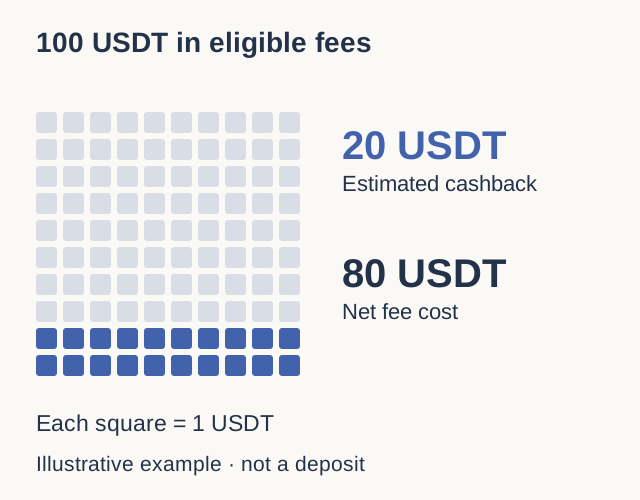
This is a rebate after fees are charged. An upfront discount reduces the original charge instead. Do not count the same benefit twice or assume cashback stacks with another promotion; check the applicable cashback conditions.
Start with the exchange, then check the benefit
On the CoinFom homepage, the exchange cards bring the fee cashback offer, regional notes and next steps together. Start with an exchange that supports your country and the product you need. A cashback percentage alone does not make an exchange suitable for you.
Select View details to read the exchange profile and fee information. Use Compare if you want to assess exchanges side by side. Regional summaries are a starting point; confirm current availability and requirements with the exchange itself.
At this review, Bitget and BingX referral buttons are available. The BingX invitation URL resolves to bingx.com/en/invite/SFILFSTQ. Bybit still shows Referral link coming soon. Do not interpret an exchange card as proof that its referral route is already active, or an active link as confirmation of your account’s eligibility.
Follow the referral route before completing signup
- On your chosen exchange card, select Join via referral when the button is available. It opens the exchange’s referral registration route in a new tab.
- Before completing registration, check the destination and the referral code or attribution shown by the exchange. If it is missing or unclear, confirm it through official support rather than assuming cashback is attached.
- Complete registration on the exchange and any account checks it requires. Confirm which account and markets qualify for the offer before trading.
You register with the exchange through this route; there is no customer signup step on CoinFom in this walkthrough. Existing-account eligibility needs separate confirmation. For example, Bybit’s official instructions place conditions on adding an affiliate code after registration, so that option should not be treated as a universal way to switch referrers. Bybit’s affiliate-code instructions.
Where the cashback is intended to arrive
CoinFom describes the benefit as an automatic credit to your own exchange Spot account, without a cashback withdrawal request on this site. Its stated schedules are:
| Exchange | Schedule supplied by CoinFom |
|---|---|
| Bitget | Daily |
| Bybit | Monday |
| BingX | Daily |
These are CoinFom’s customer-offer schedules. Public affiliate commission schedules describe payments to partners and do not independently establish the customer cashback schedule. Check your account’s referral attribution, eligible markets and any currency, minimum or cap before relying on the offer. Bitget and BingX links are available; Bybit’s link is not yet configured. Cashback conditions.
Once your offer is confirmed, compare the fees actually charged with the credit recorded in your Spot account history. If a credit is missing, check referral attribution and qualifying fees first, then contact official exchange support for account-specific help. For a CoinFom link or wording issue, use our contact page. Never send passwords, API keys or identity documents to explain a link problem.
Why cashback can be useful
The benefit is a lower net cost for qualifying fees, after the cashback is received. If two otherwise identical trading scenarios incur 100 USDT of eligible fees, receiving 20 USDT back leaves 80 USDT of those costs to bear instead of 100.
Cashback does not guarantee a profit or protect you from trading losses. It also does not remove spreads, slippage or other charges. Funding payments on perpetual contracts, for instance, are a separate mechanism described in Bybit’s funding-fee guide. Do not include them in the eligible cashback base unless your offer expressly allows it.
There is no reason to place extra trades simply to earn cashback. In the same illustration, spending another 100 USDT on eligible fees to receive 20 back still adds 80 USDT to your net costs. Use the benefit to reduce costs on trading you have independently decided is appropriate, not as a target to chase.
Your next step
Choose an exchange, read its details and confirm the referral conditions before completing signup. Then try the CoinFom calculator using eligible fees paid, not your deposit or trading volume.
Depositing Bitcoin is a separate process from receiving trading-fee cashback. If a deposit shows confirmations but has not appeared in your balance, our Bitcoin confirmations explainer shows how to distinguish the blockchain record from exchange account credit.
The useful question is not just “How much could I get back?” It is “Which of my actual fees qualify, and what will my total cost be after the credit?”
Prepared for CoinFom with AI-assisted research, writing, translation and editorial checks. Offer wording and payout-source scope reviewed on 27 September 2026. This is an educational explanation of the stated offer, not investment advice or a guarantee of payment.